> ## Documentation Index
> Fetch the complete documentation index at: https://docs.superscale.ai/llms.txt
> Use this file to discover all available pages before exploring further.
# Reference images & winning ads
> Feed Superscale visual references and proven winners to steer style, layout, product accuracy, and direction.
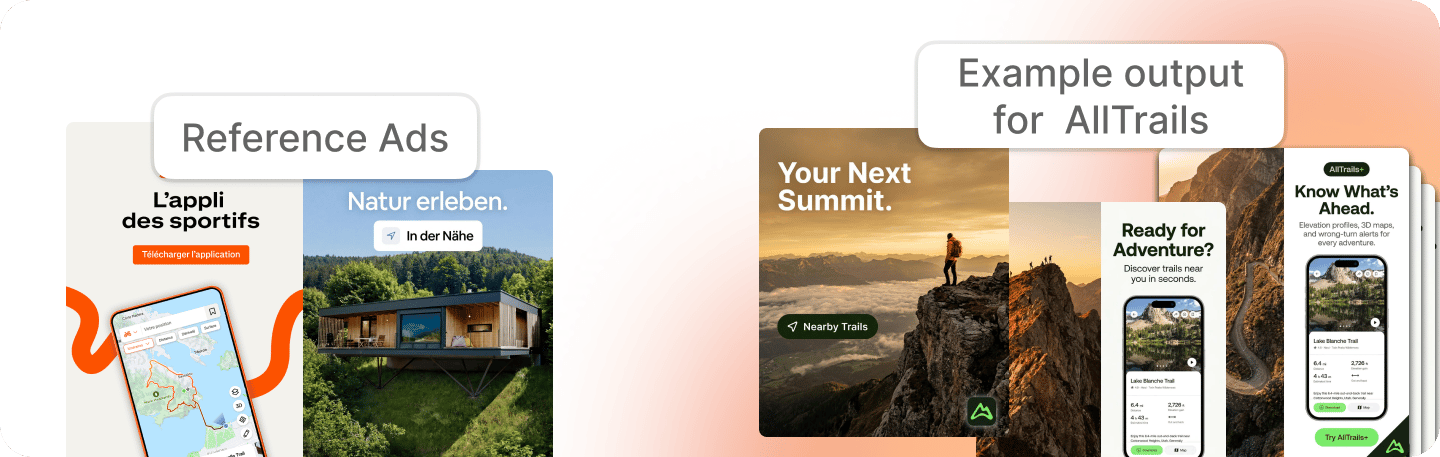
Words describe your brand. Images show it. Reference images and winning ads give the agent visual direction: what the product looks like, what an on-brand layout feels like, and which ad structures already work.
The simplest mental model: **context files are the briefing layer; visual references are the execution layer.** If the output has to look a certain way, show the agent.
 ## What to add
Logos, product shots, packaging, UI screenshots, and lifestyle images the agent can match or preserve.
Examples of the format, composition, angle, or style you want, yours or someone else's.
Proven performers saved from your own account or from [competitor research](/features/competitor-research).
Examples of layouts, claims, visuals, or styles that are off-brand, too generic, too polished, or too artificial.
## Minimum set for better output
If a generation feels generic, start here:
* Logo file and brand colors.
* Product photos or UI screenshots.
* One or two ads you already like.
* One or two competitor or inspiration ads with the format you want.
* A short note explaining what should stay fixed: product, logo, tone, layout, offer, audience, or claim.
Written guidelines tell the agent what to respect. Reference images show it what good looks like.
## How it flows through creation
When you save a visual reference at the right brand or product scope, it becomes available to the agent for future work. If a specific asset must guide a generation, attach it, select it, or name it in the task. Strong references matter because they give the agent a concrete pattern for style, layout, product accuracy, or angle.
Add the product shot, screenshot, ad, or visual direction to the right brand or product.
Give the reference a useful name: "approved logo top-right", "best-performing testimonial static", "exact product packaging".
Tell the agent which reference to use and what to preserve. Example: "Use the packaging photo exactly; only change the background and headline."
## When references matter most
Use the narrowest possible reference set. If the agent invents packaging, fake UI, or wrong logos, remove vague references and attach the exact asset that must stay real.
Upload approved ads and examples of the visual hierarchy you want. Text instructions alone are often not enough for layout taste.
Save winners from competitor research, then ask Superscale to adapt the structure to your product rather than copy the competitor's brand.
For video, references help with product visuals, scene style, creator look, and pacing. Combine them with [video context](/features/video-context).
Maintain your context as your brand evolves.
## What to add
Logos, product shots, packaging, UI screenshots, and lifestyle images the agent can match or preserve.
Examples of the format, composition, angle, or style you want, yours or someone else's.
Proven performers saved from your own account or from [competitor research](/features/competitor-research).
Examples of layouts, claims, visuals, or styles that are off-brand, too generic, too polished, or too artificial.
## Minimum set for better output
If a generation feels generic, start here:
* Logo file and brand colors.
* Product photos or UI screenshots.
* One or two ads you already like.
* One or two competitor or inspiration ads with the format you want.
* A short note explaining what should stay fixed: product, logo, tone, layout, offer, audience, or claim.
Written guidelines tell the agent what to respect. Reference images show it what good looks like.
## How it flows through creation
When you save a visual reference at the right brand or product scope, it becomes available to the agent for future work. If a specific asset must guide a generation, attach it, select it, or name it in the task. Strong references matter because they give the agent a concrete pattern for style, layout, product accuracy, or angle.
Add the product shot, screenshot, ad, or visual direction to the right brand or product.
Give the reference a useful name: "approved logo top-right", "best-performing testimonial static", "exact product packaging".
Tell the agent which reference to use and what to preserve. Example: "Use the packaging photo exactly; only change the background and headline."
## When references matter most
Use the narrowest possible reference set. If the agent invents packaging, fake UI, or wrong logos, remove vague references and attach the exact asset that must stay real.
Upload approved ads and examples of the visual hierarchy you want. Text instructions alone are often not enough for layout taste.
Save winners from competitor research, then ask Superscale to adapt the structure to your product rather than copy the competitor's brand.
For video, references help with product visuals, scene style, creator look, and pacing. Combine them with [video context](/features/video-context).
Maintain your context as your brand evolves.