> ## Documentation Index
> Fetch the complete documentation index at: https://docs.superscale.ai/llms.txt
> Use this file to discover all available pages before exploring further.
# Creating videos
> Generate, edit, and combine AI video, B-roll, scripts, voiceover, and captions into finished ads ready to export.
Superscale produces finished video ads from a brief: scripted, produced, voiced, captioned, and ready to export. The strongest production workflows are usually hybrid: use AI for hooks, storyboards, creators, or generated scenes, then combine them with real product footage, screenshots, B-roll, captions, and controlled edits.
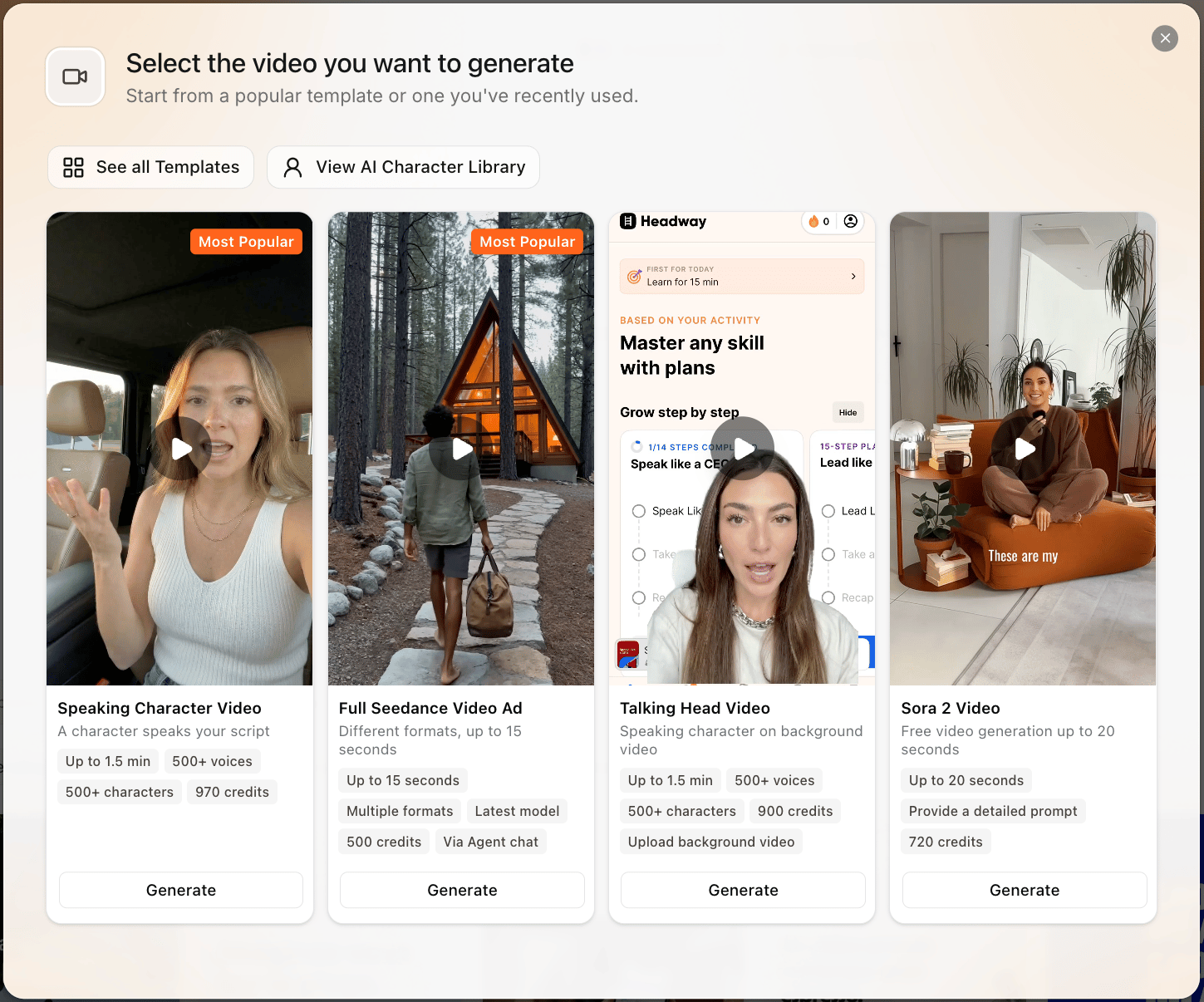 ## Choose the right video workflow
Best for fast 9:16 paid-social concepts generated directly from a brief, storyboard, and references.
A synthetic creator talks to camera in English. Strong for direct-response testimonial-style ads.
Best when product footage, app screens, packaging, or screen recordings should be the visual proof.
Use the reusable template/avatar workflow when you need a saved actor, actor selection, or more controlled assembly.
## How a video comes together
Include the audience, angle, format, language, product, and any references. If you do not know the angle yet, ask the agent to research options before it writes the storyboard.
It turns your brief into a [scene-by-scene script](/features/scripts), grounded in your context, references, and research signals.
One storyboard becomes a multi-scene 9:16 video, with native English audio or a post-mixed [voiceover](/features/voiceover-lipsync) for other languages.
Export the finished asset. If Superscale shows resize or publish controls for that asset and connected destination, use them from the export view.
## Seedance formats
Seedance chat video is currently **9:16 vertical**. The format picker offers the formats that fit your product type and language.
| Format | Best for | Language notes |
| ---------------------------- | ------------------------------------------------------------------------------------------------------ | ----------------------------------------------------- |
| **UGC Testimonial** | Selfie-style creator talking straight to camera. | English only, native audio. |
| **UGC Lifestyle** | Person on screen using, unboxing, scrolling, cooking, or applying while narration carries the message. | All languages. Non-English uses post-mixed voiceover. |
| **B-Roll (Faceless)** | Product close-ups, hands, overhead shots, macro details, and app/product proof without a face. | All languages. Physical-product focused. |
| **POV (First-Person)** | Hands and first-person view, useful for TikTok-native product moments. | All languages. |
| **Before / After** | Same-frame transformation or contrast structure. | All languages. |
| **Animated Brand Character** | Product, package, logo, or app icon comes to life as a character. | English only. |
| **Cinematic Brand Film** | Premium product film, calm narration, no creator on camera. | All languages. |
| **Studio Tabletop** | Product theatre on a studio backdrop. | All languages, physical-product focused. |
| **Slice-of-Life Cinematic** | Polished lifestyle scene with a person on screen who does not speak. | All languages. |
| **Stop-Motion** | Objects arrange around a physical product on a simple backdrop. | All languages, physical-product focused. |
| **Hands-Only Demo** | Step-by-step physical product tutorial. | All languages, physical-product focused. |
| **Mock Infomercial** | Exaggerated problem-solution parody for irreverent brands. | All languages. |
| **Long Form Story** | Longer narrative ad where the agent resolves the best matching style first. | Beta, 20-45 seconds. |
Chat video generation does not currently create horizontal or 16:9 Seedance videos. If you need a different final placement, start with a vertical ad and use the export or recreation controls shown for that asset.
## Before spending video credits
Video is expensive compared with statics, so reduce uncertainty first.
* Write or approve the script before rendering.
* Attach exact product visuals, app screenshots, or B-roll if they matter.
* Add pronunciation guidance for brand names and acronyms.
* Use a short test or smaller batch before scaling a format.
* Keep the output goal clear: hook test, product demo, testimonial, localization, or winner iteration.
* Decide whether you need Seedance chat video or a reusable video template/avatar workflow before briefing the asset.
## Common video questions
Not always. Use real B-roll, screenshots, product footage, and testimonials when those details need to be accurate. Use AI for the parts you cannot shoot quickly.
Think scene-by-scene. If one scene is weak, use the scene regeneration or replacement controls shown for that asset instead of starting from zero.
Most Seedance formats default to short-form, usually 15 seconds. Supported chat durations include 4, 5, 8, 10, 12, 15 seconds, and longer 20-45 second story formats when those formats are enabled in your video workflow.
Not as a native talk-to-camera Seedance format. Use UGC Lifestyle or B-Roll with post-mixed voiceover for non-English ads.
Add real assets, use more natural scripts, reduce over-polished delivery, choose a better voice, and keep scenes tighter. Hybrid workflows usually look more believable.
Give the agent the footage, references, voice rules, and product details it needs.
## Choose the right video workflow
Best for fast 9:16 paid-social concepts generated directly from a brief, storyboard, and references.
A synthetic creator talks to camera in English. Strong for direct-response testimonial-style ads.
Best when product footage, app screens, packaging, or screen recordings should be the visual proof.
Use the reusable template/avatar workflow when you need a saved actor, actor selection, or more controlled assembly.
## How a video comes together
Include the audience, angle, format, language, product, and any references. If you do not know the angle yet, ask the agent to research options before it writes the storyboard.
It turns your brief into a [scene-by-scene script](/features/scripts), grounded in your context, references, and research signals.
One storyboard becomes a multi-scene 9:16 video, with native English audio or a post-mixed [voiceover](/features/voiceover-lipsync) for other languages.
Export the finished asset. If Superscale shows resize or publish controls for that asset and connected destination, use them from the export view.
## Seedance formats
Seedance chat video is currently **9:16 vertical**. The format picker offers the formats that fit your product type and language.
| Format | Best for | Language notes |
| ---------------------------- | ------------------------------------------------------------------------------------------------------ | ----------------------------------------------------- |
| **UGC Testimonial** | Selfie-style creator talking straight to camera. | English only, native audio. |
| **UGC Lifestyle** | Person on screen using, unboxing, scrolling, cooking, or applying while narration carries the message. | All languages. Non-English uses post-mixed voiceover. |
| **B-Roll (Faceless)** | Product close-ups, hands, overhead shots, macro details, and app/product proof without a face. | All languages. Physical-product focused. |
| **POV (First-Person)** | Hands and first-person view, useful for TikTok-native product moments. | All languages. |
| **Before / After** | Same-frame transformation or contrast structure. | All languages. |
| **Animated Brand Character** | Product, package, logo, or app icon comes to life as a character. | English only. |
| **Cinematic Brand Film** | Premium product film, calm narration, no creator on camera. | All languages. |
| **Studio Tabletop** | Product theatre on a studio backdrop. | All languages, physical-product focused. |
| **Slice-of-Life Cinematic** | Polished lifestyle scene with a person on screen who does not speak. | All languages. |
| **Stop-Motion** | Objects arrange around a physical product on a simple backdrop. | All languages, physical-product focused. |
| **Hands-Only Demo** | Step-by-step physical product tutorial. | All languages, physical-product focused. |
| **Mock Infomercial** | Exaggerated problem-solution parody for irreverent brands. | All languages. |
| **Long Form Story** | Longer narrative ad where the agent resolves the best matching style first. | Beta, 20-45 seconds. |
Chat video generation does not currently create horizontal or 16:9 Seedance videos. If you need a different final placement, start with a vertical ad and use the export or recreation controls shown for that asset.
## Before spending video credits
Video is expensive compared with statics, so reduce uncertainty first.
* Write or approve the script before rendering.
* Attach exact product visuals, app screenshots, or B-roll if they matter.
* Add pronunciation guidance for brand names and acronyms.
* Use a short test or smaller batch before scaling a format.
* Keep the output goal clear: hook test, product demo, testimonial, localization, or winner iteration.
* Decide whether you need Seedance chat video or a reusable video template/avatar workflow before briefing the asset.
## Common video questions
Not always. Use real B-roll, screenshots, product footage, and testimonials when those details need to be accurate. Use AI for the parts you cannot shoot quickly.
Think scene-by-scene. If one scene is weak, use the scene regeneration or replacement controls shown for that asset instead of starting from zero.
Most Seedance formats default to short-form, usually 15 seconds. Supported chat durations include 4, 5, 8, 10, 12, 15 seconds, and longer 20-45 second story formats when those formats are enabled in your video workflow.
Not as a native talk-to-camera Seedance format. Use UGC Lifestyle or B-Roll with post-mixed voiceover for non-English ads.
Add real assets, use more natural scripts, reduce over-polished delivery, choose a better voice, and keep scenes tighter. Hybrid workflows usually look more believable.
Give the agent the footage, references, voice rules, and product details it needs.